<?xml version="1.0" encoding="ISO-8859-1"?>
<rdf:RDF xmlns:rdf="http://www.w3.org/1999/02/22-rdf-syntax-ns#" xmlns:ref="http://purl.org/rss/1.0/modules/reference/" xmlns:dc="http://purl.org/dc/elements/1.1/" xmlns="http://purl.org/rss/1.0/">
	<channel rdf:about="http://jambot.com/blog/rss.rdf">
		<title>JamBot Blog</title>
		<link>http://jambot.com/blog/index.php</link>
		<description><![CDATA[]]></description>
		<items>
			<rdf:Seq>
				<rdf:li resource="http://jambot.com/blog/index.php?entry=entry070311-185623" />
				<rdf:li resource="http://jambot.com/blog/index.php?entry=entry060401-164649" />
				<rdf:li resource="http://jambot.com/blog/index.php?entry=entry060318-233319" />
			</rdf:Seq>
		</items>
	</channel>
	<item rdf:about="http://jambot.com/blog/index.php?entry=entry070311-185623">
		<title>A fast OS X Xgrid using Linux and XP boxes as agents</title>
		<link>http://jambot.com/blog/index.php?entry=entry070311-185623</link>
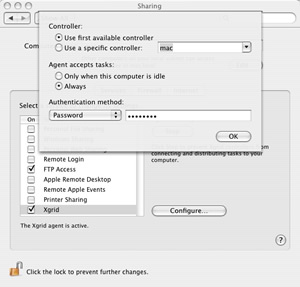
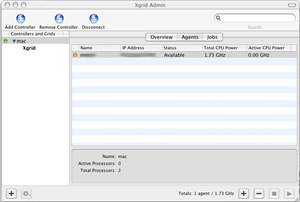
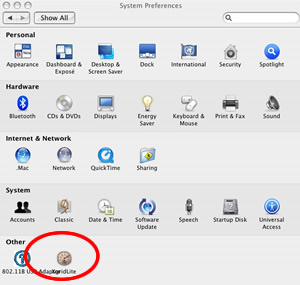
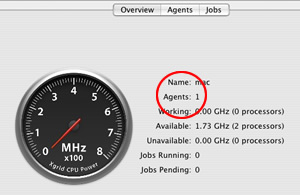
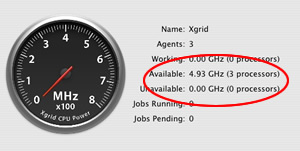
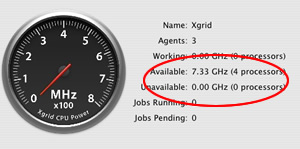
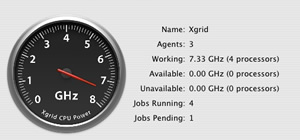
		<description><![CDATA[Need a quick xgrid to harness the power of multiple processors on your network? <br /><br />This is a long looking entry but that&#039;s because of all the images :). It should take about a half hour to get your xgrid up and running.<br /><br />Here&#039;s how:<br /><br />First you need one Mac running Tiger (OSX) to control the grid. This doesn&#039;t need to be a powerhouse Mac as it will be acting as your controller, the only requirement is that the Mac is running OS X Tiger.<br /><br />You will need to download and install: <a href="http://edbaskerville.com/software/xgridlite/" >xgridlite</a><br /><br />You will have a new entry in your System Preferences:<br /><br /><img src="xgrid-blog/sp.jpg" width="300" height="285" border="0" alt="" /><br /><br />Start the controller and specify your security settings.<br /><br /><br />Back to your System Preferences &gt; Sharing &gt;<br /> Start xgrid<br /><br /><img src="xgrid-blog/sp2.jpg" width="300" height="287" border="0" alt="" /><br /><br />Next, you will need to download and install: <a href="http://www.apple.com/support/downloads/serveradmintools1047.html" >Server Admin Tools</a><br /><br />Start Xgrid Admin &gt; Add Controller<br /><br /><img src="xgrid-blog/sp3.jpg" width="300" height="202" border="0" alt="" /><br /><br />Click on Agents and see that your mac has been added via the Xgrid Admin GUI, we added a dual processor Mac, so we see : 1 agent and 2 processors.<br /><br /><img src="xgrid-blog/sp4.jpg" width="300" height="195" border="0" alt="" /><br /><br />Next, we add some additional agents:<br /><br />Lets setup 2 agents, one for a linux box and one for an XP box, we&#039;ll call the agents respectively &quot;box1&quot; and &quot;box2&quot;.<br /><br />Xgrid Admin &gt; Agent &gt; Add Agent &gt; box1<br /><br />Xgrid Admin &gt; Agent &gt; Add Agent &gt; box2<br /><br />You will now see 3 Agents.<br /><br />Okay, now onto configuring our agent boxes.<br /><br />On each box that you want to run as an agent, download: <a href="http://sourceforge.net/project/showfiles.php?group_id=147282" >Xgridagent  for Java</a><br /><br />On your linux box:<br /><br />Unpack xgridagent<br /><br />cd into the xgridagent directory.<br /><br />From the xgridagent README:<br /><br />=======<br />usage:	java -jar xgridagent.jar host name mhz<br /><br />	host is the address or hostname on the controller<br />	name is the name of this agent<br />	mhz is the CPU power of one CPU in this agent<br />	<br />	run the program from within the xgridagent directory<br />=======<br /><br />So, if your Mac is at 10.12.1.111 and the box you are adding is running a 3.2 Ghz processor, your commands would look something like this:<br /><br />$cd /wherever/you/unpacked/xgridagent<br />$ java -jar xgridagent.jar 10.12.1.111  box1  3200<br /><br />some output:<br /><br />Connected to controller: 10.12.1.111<br /><br />hooray! We are connected to the xgrid controller on the Mac.<br /><br /><img src="xgrid-blog/sp5.jpg" width="300" height="151" border="0" alt="" /><br /><br />Let&#039;s add box2 (an XP box running at 2400 Mhz)<br /><br />Make sure <a href="http://cygwin.com/" >cygwin</a> is installed on your XP.<br /><br />$cd /wherever/you/unpacked/xgridagent<br />$ java -jar xgridagent.jar 10.12.1.111  box2  2400<br /><br />some output:<br /><br />Connected to controller: 10.12.1.111<br /><br />You now have a working grid running at 7.33 Mhz. Pretty cool.<br /><br /><img src="xgrid-blog/sp6.jpg" width="300" height="149" border="0" alt="" /><br /><br />You can run xgrid from the command line, try:<br /><br />$ xgrid -h localhost -job submit /usr/bin/echo Hello World<br /><br /><br /><img src="xgrid-blog/sp8.jpg" width="300" height="140" border="0" alt="" /><br /><br />You can add to your grid by adding agents in Xgrid Admin and running xgridagent on as many boxes as you need.<br /><br />To add Macs to your grid, go to System Preferences &gt; Sharing and start xgrid.<br /><br /><a href="http://developer.apple.com/documentation/Darwin/Reference/ManPages/man1/xgrid.1.html" >xgrid man page</a><br /><br />Get <a href="http://cmgm.stanford.edu/~cparnot/xgrid-stanford/html/goodies/GridStuffer-info.html" >GridStuffer</a> to give your xgrid a workout.<br /><br />Have fun!]]></description>
	</item>
	<item rdf:about="http://jambot.com/blog/index.php?entry=entry060401-164649">
		<title>Off the beaten path but worth a search!</title>
		<link>http://jambot.com/blog/index.php?entry=entry060401-164649</link>
		<description><![CDATA[In the interest of promoting information access, here are a few &quot;off the radar&quot; search engines that do a fine job.<br /><br /><a href="http://www.gigablast.com/" target="_blank" >Gigablast</a><br /><br />Operated by <a href="http://www.gigablast.com/bio.html" target="_blank" >Matt Dwells</a> this is probably the most sophisticated, advanced engine that could be in the &quot;roll your own&quot; family, pretty much a one man show but some major cool features and advanced options make gigablast a very cool and comprehensive search engine, I have a hard time believing you couldn&#039;t find what you are looking for there.<br /><br />Try it, you&#039;ll like it.<br /><br /><a href="http://www.mozdex.com/" target="_blank" >Mozdex</a><br /><br />This engne is probably the most well known <a href="http://lucene.apache.org/nutch/" target="_blank" >nutch</a> powered search engine currently operating. Mozdex is in beta but who in search really isn&#039;t? Beyond promoting open source search, the operators are also looking for new ways to sell advertising to fund the expense of running a search engine, clearly they are thinking forward and also maintain a <a href="http://www.libervis.com/wordpress+index.htm" target="_blank" >blog</a> for further conversation.<br /><br />Thats 2 for now! Check them out!]]></description>
	</item>
	<item rdf:about="http://jambot.com/blog/index.php?entry=entry060318-233319">
		<title>Search Engine Diversity?</title>
		<link>http://jambot.com/blog/index.php?entry=entry060318-233319</link>
		<description><![CDATA[JamBot is our attempt to make the search landscape a bit more diverse. Should there be one or two (or three) BIG dogs allowing the fate of information access to rest in the hands of the few or should there be a wide and varied information landscape available to those who have need of information? Can the search market be fragmented, are search habits hard to break? We hope to explore these evolving issues and have a little bit of fun while doing it!<br /><br /><br />Thanks for coming by.]]></description>
	</item>
</rdf:RDF>